
Governance Routing
Configuration instructions for setting up governance routing via Virtual Keys in the Web UI
DeepIntShield offers two powerful methods for routing requests across AI providers, each serving different use cases:
When both methods are available, governance takes precedence because users have explicitly defined their routing preferences through provider configurations on Virtual Keys.
The Model Catalog is the registry of which models are available from which providers. It lets you route by model name (for example, gpt-4o) without manually listing every model for every provider, and it keeps per-model pricing current for cost and budget calculations.
What it does for you: when you request a plain model name like claude-3-5-sonnet, the catalog automatically resolves every configured provider that can serve it - including proxy and compatibility providers - so a single request can route to Anthropic, Vertex, Bedrock, or OpenRouter depending on which providers you have configured. You do not have to list each provider-specific variant:
| Requested model | Also resolves through |
|---|---|
claude-3-5-sonnet | Anthropic, Vertex, Bedrock, OpenRouter |
gpt-4o | OpenAI, Azure |
gpt-3.5-turbo | OpenAI, Groq |
The catalog refreshes automatically (pricing/model data is re-synced periodically, and a provider’s model list is re-fetched whenever you add or update that provider), so newly released models become usable without manual maintenance. You can also trigger a manual refresh from the dashboard: open the provider on the Providers page and use the model-list refresh control to re-fetch its available models.
The allowed_models field in provider configs controls which models can be used with that provider. Understanding its behavior is crucial for governance routing.
Configuration:
{ "provider_configs": [ { "provider": "openai", "allowed_models": [], // Empty = defer to catalog "weight": 1.0 } ]}Behavior:
Examples:
# ✅ Allowed (in catalog)curl -H "x-bf-vk: vk-123" -d '{"model": "gpt-4o"}'
# ✅ Allowed (in catalog)curl -H "x-bf-vk: vk-123" -d '{"model": "gpt-3.5-turbo"}'
# ❌ Rejected (not in OpenAI catalog)curl -H "x-bf-vk: vk-123" -d '{"model": "claude-3-5-sonnet"}'
Use Cases:
Configuration:
{ "provider_configs": [ { "provider": "openai", "allowed_models": ["gpt-4o", "gpt-4o-mini"], // Only these two "weight": 1.0 }, { "provider": "anthropic", "allowed_models": ["claude-3-5-sonnet-20241022"], // Specific version "weight": 1.0 } ]}Behavior:
Examples:
# ✅ Allowed (in explicit list)curl -H "x-bf-vk: vk-123" -d '{"model": "gpt-4o"}'
# ❌ Rejected (not in explicit list)curl -H "x-bf-vk: vk-123" -d '{"model": "gpt-4-turbo"}'# Even though gpt-4-turbo is in the OpenAI catalog!
# ✅ Allowed (exact match for Anthropic)curl -H "x-bf-vk: vk-123" -d '{"model": "claude-3-5-sonnet-20241022"}'
# ❌ Rejected (version mismatch)curl -H "x-bf-vk: vk-123" -d '{"model": "claude-3-5-sonnet-20240620"}'
Provider-Prefixed Entries:
You can also use provider-prefixed model names in allowed_models. A provider-prefixed entry like openai/gpt-4o matches a request for the unprefixed model gpt-4o:
{ "provider_configs": [ { "provider": "openrouter", "allowed_models": ["openai/gpt-4o", "anthropic/claude-3-5-sonnet"], "weight": 1.0 } ]}# A request for "gpt-4o" matches the allowed entry "openai/gpt-4o"# and is routed to OpenRoutercurl -H "x-bf-vk: vk-123" -d '{"model": "gpt-4o"}'This is particularly useful for proxy providers (OpenRouter, Vertex) where you want to explicitly control which upstream models are accessible.
Use Cases:
Key Concept: Deployments are key-specific mappings that allow user-friendly model names to map to provider-specific deployment identifiers.
How Deployments Work:
deployments: {"alias": "deployment-id"}Azure OpenAI Example:
Provider configuration with deployment mapping:
{ "providers": { "azure": { "keys": [ { "name": "azure-prod-key", "value": "your-api-key", "models": [], // Not used when deployments exist "azure_key_config": { "endpoint": "https://your-resource.openai.azure.com", "deployments": { "gpt-4o": "my-prod-gpt4o-deployment", "gpt-4o-mini": "my-mini-deployment" } } } ] } }}With this config, you request the friendly alias ({"model": "gpt-4o"}) and DeepIntShield sends the mapped deployment name (my-prod-gpt4o-deployment) to Azure. The aliases (gpt-4o, gpt-4o-mini) become the allowed model names for that key.
Bedrock Example with Inference Profiles:
{ "providers": { "bedrock": { "keys": [ { "name": "bedrock-key", "models": [], "bedrock_key_config": { "access_key": "your-access-key", "secret_key": "your-secret-key", "region": "us-east-1", "deployments": { "claude-sonnet": "us.anthropic.claude-3-5-sonnet-20241022-v2:0", "claude-opus": "us.anthropic.claude-3-opus-20240229-v1:0" } } } ] } }}Here you request the short alias ({"model": "claude-sonnet"}) and DeepIntShield sends the full inference profile (us.anthropic.claude-3-5-sonnet-20241022-v2:0) to Bedrock. The aliases (claude-sonnet, claude-opus) are the allowed model names.
Priority of Model Restrictions:
The allowed models for a key are determined in this order:
1. If key.models is NOT empty → Use key.models2. Else if deployments exist → Use deployment aliases (map keys)3. Else → All models allowed (use Model Catalog)Example with Both:
{ "keys": [ { "models": ["gpt-4o", "gpt-3.5-turbo"], // Explicit restriction "azure_key_config": { "deployments": { "gpt-4o": "my-deployment", "gpt-4-turbo": "another-deployment" // NOT accessible! } } } ]}Result: Only ["gpt-4o", "gpt-3.5-turbo"] allowed (models field takes priority)
Vertex Example (similar pattern):
{ "keys": [ { "vertex_key_config": { "project_id": "my-project", "region": "us-central1", "deployments": { "claude-3-5-sonnet": "anthropic/claude-3-5-sonnet@20241022", "gemini-pro": "google/gemini-2.5-pro" } } } ]}Use Cases for Deployments:
This allows user-friendly model names in requests while supporting provider-specific deployment patterns at the key level - you request the alias, and the mapped deployment ID is what reaches the provider.
Configuration:
{ "provider_configs": [ { "provider": "openai", "allowed_models": ["gpt-4o"], "weight": 0.5 }, { "provider": "azure", "allowed_models": ["gpt-4o"], "weight": 0.5 } ]}Request:
curl -H "x-bf-vk: vk-123" \ -d '{"model": "gpt-4o"}'Routing Behavior: Both providers allow gpt-4o, so the request is split 50/50 between them by weight. If the chosen provider fails, the remaining one is used as a fallback.
Special Cross-Provider Scenarios:
{ "provider_configs": [ { "provider": "openrouter", "allowed_models": [] // Use catalog } ]}Request claude-3-5-sonnet:
anthropic/claude-3-5-sonnet in the OpenRouter catalogUse Case: Route 99% of OpenAI traffic through OpenRouter for cost savings, keep 1% direct for fallback
{ "provider_configs": [ { "provider": "openai", "allowed_models": ["gpt-4o"], "weight": 0.01 // 1% direct to OpenAI }, { "provider": "openrouter", "allowed_models": ["openai/gpt-4o"], // Provider-prefixed "weight": 0.99 // 99% via OpenRouter } ]}A request for gpt-4o is allowed on both providers (the provider-prefixed entry openai/gpt-4o matches the unprefixed request). By weight, ~99% of traffic goes to OpenRouter and ~1% goes directly to OpenAI, which also serves as the fallback.
{ "provider_configs": [ { "provider": "vertex", "allowed_models": ["claude-3-5-sonnet", "gemini-2.5-pro"] } ]}A request for claude-3-5-sonnet is allowed (it’s in allowed_models and the catalog knows Vertex can serve it) and is routed to Vertex.
{ "provider_configs": [ { "provider": "groq", "allowed_models": ["gpt-3.5-turbo"] } ]}A request for gpt-3.5-turbo is allowed (Groq exposes it through its OpenAI-compatible catalog) and is routed to Groq.
Governance-based routing lets you explicitly define which providers and models should handle requests for a specific Virtual Key. Attach one or more provider_configs to a Virtual Key, and requests using that key are distributed across those providers by the weights you set. Providers that are over budget, rate-limited, or that don’t allow the requested model are automatically skipped, and the remaining providers (highest weight first) become fallbacks.
{ "provider_configs": [ { "provider": "openai", "allowed_models": ["gpt-4o", "gpt-4o-mini"], "weight": 0.3, "budget": { "max_limit": 100.0, "current_usage": 45.0 } }, { "provider": "azure", "allowed_models": ["gpt-4o"], "weight": 0.7, "rate_limit": { "token_max_limit": 100000, "token_reset_duration": "1m" } } ]}Send a request with your Virtual Key and a plain model name:
curl -X POST https://app.deepintshield.com/v1/chat/completions \ -H "x-bf-vk: vk-prod-main" \ -d '{"model": "gpt-4o", "messages": []}'With the example config above, both OpenAI (weight 0.3) and Azure (weight 0.7) allow gpt-4o and are within their budget/rate limits, so the request is split by weight - roughly 70% to Azure and 30% to OpenAI. If the selected provider fails, the other is used as a fallback.
| Feature | Description |
|---|---|
| Explicit Control | Define exactly which providers and models are accessible |
| Budget Enforcement | Automatically exclude providers exceeding budget limits |
| Rate Limit Protection | Skip providers that have hit rate limits |
| Weighted Distribution | Control traffic distribution with custom weights |
| Automatic Fallbacks | Failed providers automatically retry with next highest weight |
Assign higher weights to cheaper providers for cost-sensitive workloads:
{ "provider_configs": [ {"provider": "groq", "weight": 0.7}, {"provider": "openai", "weight": 0.3} ]}Create different Virtual Keys for dev/staging/prod with different provider access:
{ "virtual_keys": [ { "id": "vk-dev", "provider_configs": [{"provider": "ollama"}] }, { "id": "vk-prod", "provider_configs": [{"provider": "openai"}, {"provider": "azure"}] } ]}Restrict specific Virtual Keys to compliant providers:
{ "provider_configs": [ {"provider": "azure", "allowed_models": ["gpt-4o"]}, {"provider": "bedrock", "allowed_models": ["claude-3-5-sonnet"]} ]}Adaptive Load Balancing automatically routes each request to the best-performing provider and API key based on live metrics (error rates, latency, rate-limit pressure), so you get failover and optimal routing without tuning weights by hand. It works at two levels: it picks the best provider for the model (when you haven’t pinned one), and - even when the provider is already fixed by governance or by you - it still picks the best-performing API key within that provider.
To use it, enable adaptive load balancing for your deployment and send requests as usual. Send a plain model name (for example gpt-4o) to let it choose the provider, or a prefixed name (openai/gpt-4o) to fix the provider and let it optimize only the key:
# Let adaptive routing pick the provider and keycurl -X POST https://app.deepintshield.com/v1/chat/completions \  -H "Authorization: Bearer sk-bf-your-virtual-key" \  -d '{"model": "gpt-4o", "messages": [...]}'
# Fix the provider; adaptive routing still picks the best keycurl -X POST https://app.deepintshield.com/v1/chat/completions \ -H "Authorization: Bearer sk-bf-your-virtual-key" \ -d '{"model": "openai/gpt-4o", "messages": [...]}'| Behavior | What it means for you |
|---|---|
| Automatic Optimization | No manual weight tuning required |
| Real-time Adaptation | Routing adjusts continuously as live latency and error rates change |
| Automatic Failover | Failing providers and keys are removed from rotation, then re-introduced once they recover |
| Per-key Optimization | Picks the best API key within a provider, even when the provider is fixed |
Monitor load balancing performance from the dashboard:
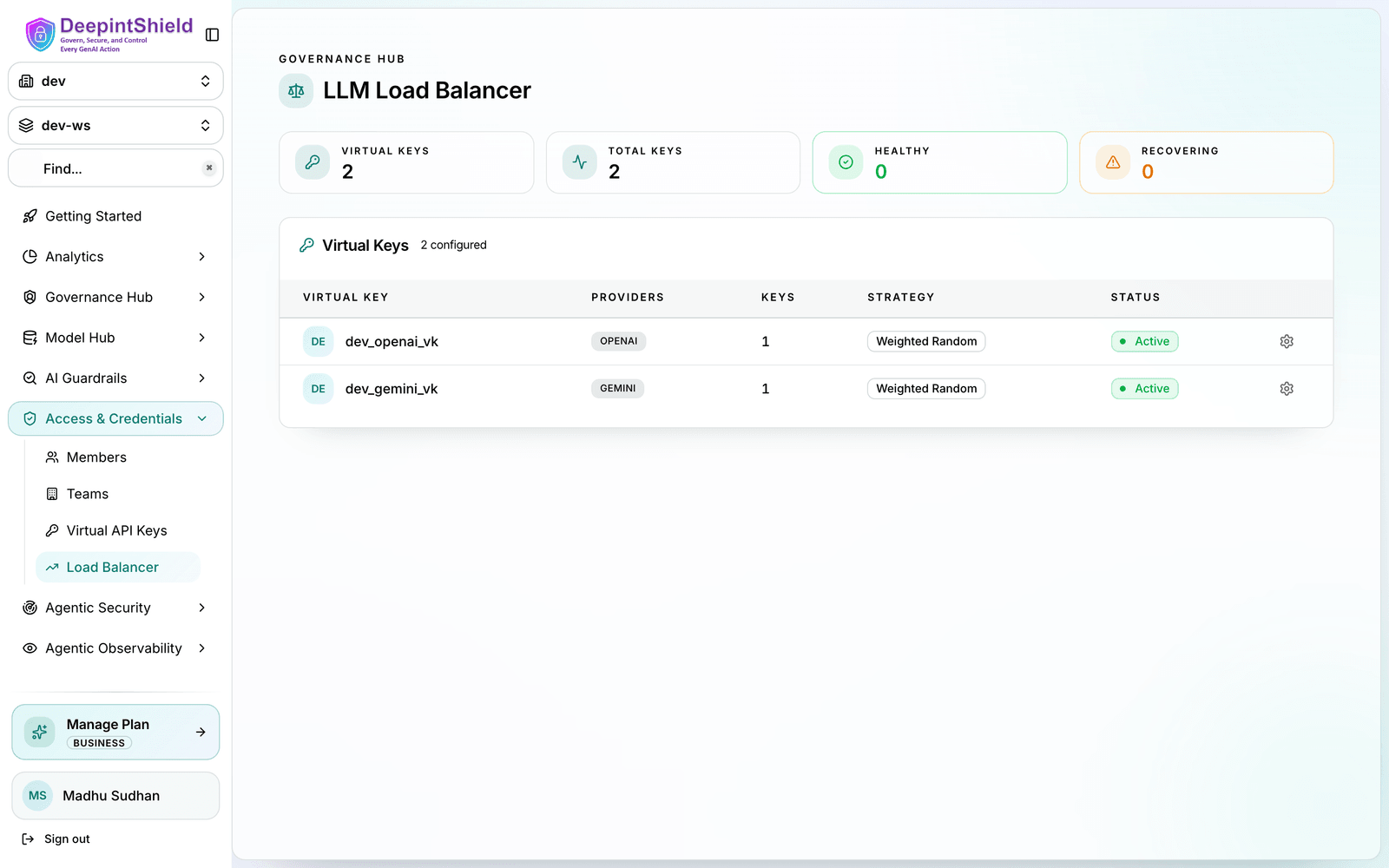
The dashboard shows:
Governance and adaptive load balancing complement each other. The practical rule is:
provider_configs (or by you when you send a prefixed model like openai/gpt-4o). Otherwise adaptive load balancing picks the best-performing provider for the model.Setup:
provider_configs definedRequest:
curl -X POST https://app.deepintshield.com/v1/chat/completions \ -H "x-bf-vk: vk-prod-main" \ -d '{"model": "gpt-4o", "messages": [...]}'Behavior:
azure/gpt-4o.Setup:
provider_configsRequest:
curl -X POST https://app.deepintshield.com/v1/chat/completions \ -H "Authorization: Bearer sk-bf-your-virtual-key" \ -d '{"model": "gpt-4o", "messages": [...]}'Behavior:
gpt-4o (say OpenAI), and the best-performing OpenAI key within it. The request is forwarded to OpenAI with that key.Setup:
provider_configs definedRequest:
curl -X POST https://app.deepintshield.com/v1/chat/completions \ -H "x-bf-vk: vk-prod-main" \ -d '{"model": "gpt-4o", "messages": [...]}'Behavior:
azure/gpt-4o.Why? Governance controls the provider (your explicit intent), while load balancing still optimizes the key for you.
Setup:
Request:
curl -X POST https://app.deepintshield.com/v1/chat/completions \ -H "Authorization: Bearer sk-bf-your-virtual-key" \ -d '{"model": "openai/gpt-4o", "messages": [...]}'Behavior:
openai/gpt-4o), so provider selection is skipped.Why? Even when you specify the provider, key-level optimization keeps picking the best-performing OpenAI key.
| Scenario | Who picks the provider | Who picks the key |
|---|---|---|
VK with provider_configs | Governance (weighted random) | Static weights, or adaptive if enabled |
VK without provider_configs, adaptive enabled | Adaptive load balancing | Adaptive load balancing |
| Model sent with provider prefix | You (already specified) | Adaptive load balancing |
| No adaptive load balancing | Governance, your prefix, or the catalog | Static weights |
Routing Rules give you dynamic, expression-based control over routing. You write a CEL expression (for example, headers["x-tier"] == "premium") and a target provider/model; when the expression matches a request, the rule overrides whatever governance or default routing would have chosen. Rules are highest-priority: a matching rule wins over a Virtual Key’s provider_configs. If no rule matches, governance and load balancing decide as usual.
Routing rules access request context through CEL variables:
// Request contextmodel                      // Requested modelprovider                   // Current provider
// Headers and parameters (case-insensitive)headers["x-tier"]          // Request headerparams["region"]           // Query parameter
// Organization contextvirtual_key_id             // VirtualKey IDteam_name                  // Team namecustomer_id                // Customer ID
// Capacity metrics (0-100 percentage)budget_used // Budget usage %tokens_used // Token rate limit usage %request // Request rate limit usage %headers["x-tier"] == "premium" // → openai/gpt-4obudget_used > 85 // → groq/llama-2 (cheaper)team_name == "ml-research" // → anthropic/claude-3-opusheaders["x-environment"] == "production" &&tokens_used < 75 &&team_name == "ai-platform" // → openai/gpt-4oRules are evaluated in organizational precedence order (first-match-wins):
1. VirtualKey scope (highest priority)2. Team scope3. Customer scope4. Global scope (lowest priority)Within each scope, rules are sorted by priority (ascending: 0 before 10).
| Feature | Description |
|---|---|
| CEL Expressions | Powerful, composable condition language with multiple operators |
| Scope Hierarchy | Rules at VirtualKey/Team/Customer/Global levels with proper precedence |
| Dynamic Override | Override provider and/or model based on runtime conditions |
| Fallback Chains | Define multiple fallback providers for automatic failover |
| Priority Ordering | Lower priority evaluated first within same scope |
| Capacity Awareness | Access real-time budget and rate limit usage percentages |
budget_used > 85 routing to a cheaper provider), its target provider/model wins and the Virtual Key’s provider_configs are bypassed.Routing rules are configured in the dashboard:
For complete documentation, see Routing Rules Documentation.
Use Governance When:
✅ Compliance requirements: Need to ensure data stays in specific regions or providers ✅ Cost optimization: Want explicit control over traffic distribution to cheaper providers ✅ Budget enforcement: Need hard limits on spending per provider ✅ Environment separation: Different teams/apps need different provider access ✅ Rate limit management: Need to respect provider-specific rate limits
Use Routing Rules When:
✅ Dynamic routing: Route based on runtime request context (headers, parameters) ✅ Capacity-aware routing: Switch to fallback when budget/rate limits high ✅ Organization-based routing: Different rules for teams/customers ✅ A/B testing: Route subset of traffic to test new models ✅ Complex conditions: Multiple criteria (e.g., tier + capacity + team)
Use Load Balancing When:
✅ Performance optimization: Want automatic routing to best-performing providers ✅ Minimal configuration: Prefer hands-off operation with intelligent defaults ✅ Dynamic workloads: Traffic patterns change frequently ✅ Automatic failover: Need instant adaptation to provider issues ✅ Multi-provider redundancy: Want seamless provider switching based on availability
Use All Three Together:
✅ Complete solution: Governance provides base routing, routing rules add dynamic override, load balancing optimizes keys ✅ Maximum flexibility: Different Virtual Keys use different strategies (governance vs routing rules vs load balancing) ✅ Enterprise deployments: Complex organizations with multiple requirements per layer
Governance Routing
Configuration instructions for setting up governance routing via Virtual Keys in the Web UI
Routing Rules
Dynamic, expression-based routing using CEL expressions for runtime conditions
Adaptive Load Balancing
Enable and configure performance-based provider and key routing (Team plan and above)
Virtual Keys
Learn how to create and configure Virtual Keys
Fallbacks
Understand how automatic fallbacks work across providers