
Load Balance
Smart Key Distribution
Section titled “Smart Key Distribution”Configure multiple API keys per provider and DeepIntShield spreads traffic across them by weight, only using keys that support the requested model. This gives you load balancing across keys, model-specific access control, and automatic failover when a key fails - without any changes to your request payloads.
You control behavior with three settings per key:
weight- how much traffic the key receives relative to others.models- which models the key is eligible for (empty = all models).- Deployment mappings - for Azure and Bedrock, which deployment/inference profile to use.
To target a specific stored key instead of weighted selection, reference it by name or ID (see Custom Key Usage). To bypass key management entirely, send a raw key (see Direct Key Bypass).
Configuring Keys
Section titled “Configuring Keys”Configure provider keys with weights, model filtering, and deployment mappings from the Web UI:
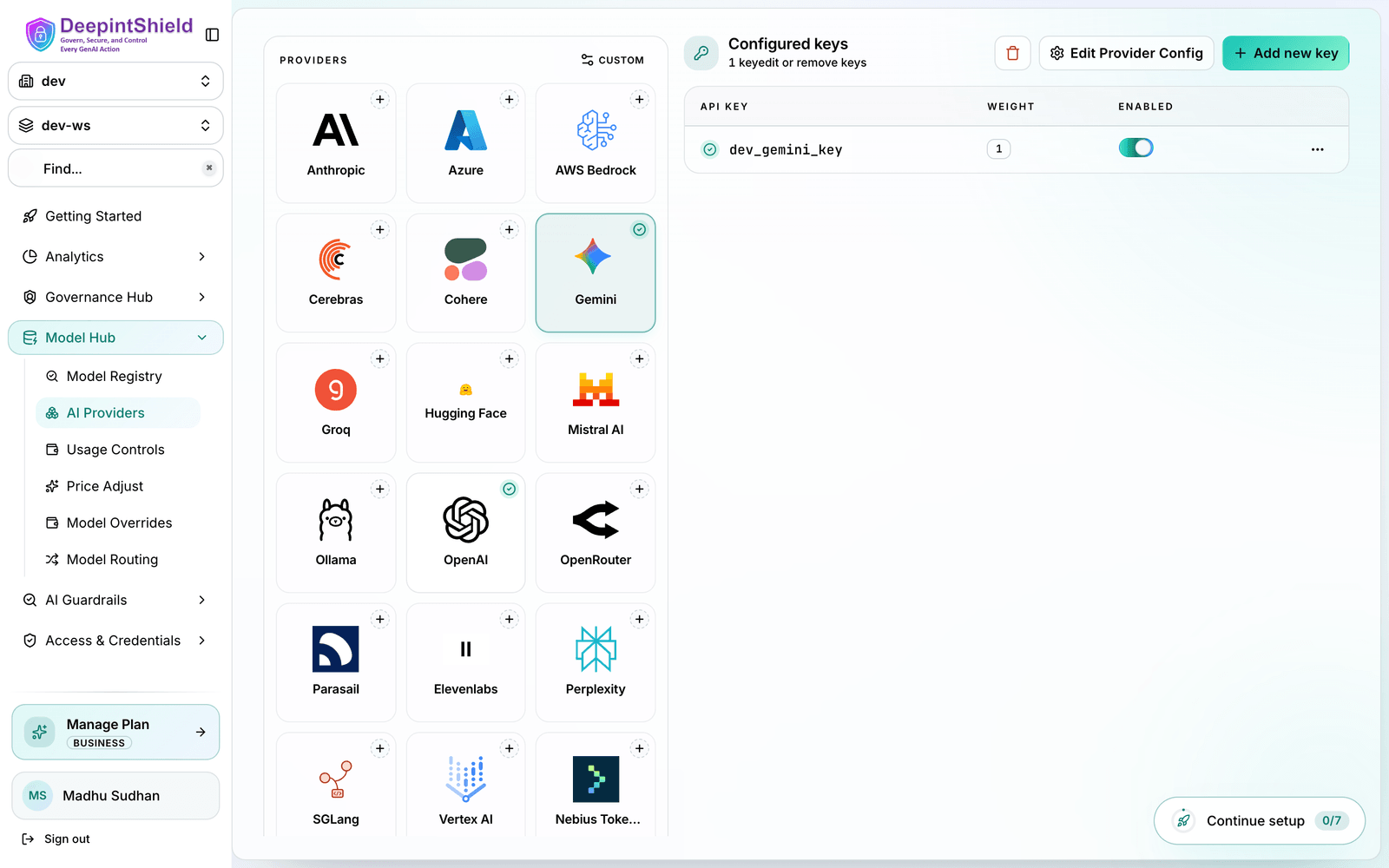
- Navigate to the Providers page in the Web UI.
- Select the provider you want to configure (e.g. OpenAI), or add it if it isn’t configured yet.
- Add one or more keys. For each key set:
- Name - a logical name you can reference later (e.g.
openai-key-1). - Value - the secret, or an
env.reference to an environment variable (e.g.env.OPENAI_API_KEY_1). - Models - the models this key is eligible for. Leave empty to allow all models for the provider.
- Weight - how much traffic this key receives relative to the others (e.g.
0.7and0.3to split roughly 70/30). - Deployment mappings - for Azure and Bedrock, the deployment/inference profile to use.
- Name - a logical name you can reference later (e.g.
- Click Save.
Once your keys are configured, your normal inference requests automatically use weighted key selection - no change to the request payload is needed:
# Regular request (uses weighted key selection)curl -X POST https://app.deepintshield.com/v1/chat/completions \  -H "Content-Type: application/json" \  -H "x-bf-vk: sk-bf-your-virtual-key" \  -d '{    "model": "openai/gpt-4o-mini",    "messages": [{"role": "user", "content": "Hello!"}]  }'
# Request with direct API key (bypasses key management)curl -X POST https://app.deepintshield.com/v1/chat/completions \  -H "Content-Type: application/json" \  -H "Authorization: Bearer sk-your-direct-api-key" \  -d '{    "model": "openai/gpt-4o-mini",    "messages": [{"role": "user", "content": "Hello!"}]  }'
Weighted Load Balancing
Section titled “Weighted Load Balancing”DeepIntShield uses weighted random selection to distribute requests across multiple keys. This allows you to:
Control Traffic Distribution:
- Assign higher weights to premium keys with better rate limits
- Balance between production and backup keys
- Gradually migrate traffic during key rotation
How weights map to traffic:
Key 1: Weight 0.7 → ~70% of requestsKey 2: Weight 0.3 → ~30% of requestsWeights are relative, so they don’t have to sum to 1.0. If a selected key fails, DeepIntShield automatically falls back to the next eligible key.
Model Whitelisting and Filtering
Section titled “Model Whitelisting and Filtering”Keys can be restricted to specific models for access control and cost management:
Model Filtering Logic:
- Empty
modelsarray: Key supports ALL models for that provider - Populated
modelsarray: Key only supports listed models - Model mismatch: Key is excluded from selection for that request
Use Cases:
- Premium Models: Dedicated keys for expensive models (GPT-4, Claude-3)
- Team Separation: Different keys for different teams or projects
- Cost Control: Restrict access to specific model tiers
- Compliance: Separate keys for different security requirements
Example Model Restrictions:
{ "keys": [ { "name": "openai-pre-key-1", "value": "premium-key", "models": ["gpt-4o", "o1-preview"], // Only premium models "weight": 1.0 }, { "name": "openai-std-key-1", "value": "standard-key", "models": ["gpt-4o-mini", "gpt-3.5-turbo"], // Only standard models "weight": 1.0 } ]}Deployment Mapping (Azure & Bedrock)
Section titled “Deployment Mapping (Azure & Bedrock)”For cloud providers with deployment-based routing, DeepIntShield validates deployment availability:
Azure:
- Keys must have deployment mappings for specific models
- Deployment name maps to actual Azure deployment identifier
- Missing deployment excludes key from selection
AWS Bedrock:
- Supports model profiles and direct model access
- Deployment mappings enable inference profile routing
A key is only eligible for a model if it has a matching deployment mapping. Keys without one are skipped for that request, then weighted selection runs across the remaining eligible keys.
Custom Key Usage (By Name or ID)
Section titled “Custom Key Usage (By Name or ID)”DeepIntShield supports referencing a stored provider key by name or by ID instead of sending the raw secret. This can be useful when you want callers to reference logical key names or stable IDs and let the gateway resolve the actual secret from configured provider keys.
When both are provided, ID takes priority over name.
Send x-bf-api-key-id: <key-id> on the request. The gateway looks up the key with that ID.
By Name
Section titled “By Name”Send x-bf-api-key: <key-name> on the request. The gateway looks up the named key and uses its secret for the upstream provider call.
Note: Both mechanisms reference a stored key (not the raw secret). The gateway resolves the key against configured provider keys and applies model filtering and deployment mapping. When an explicit key ID or name is supplied, weighted selection is bypassed and the referenced key is used directly.
# Example: request referencing a stored key name that doesn't existcurl -X POST https://app.deepintshield.com/v1/chat/completions \ -H "Content-Type: application/json" \ -H "x-bf-vk: sk-bf-your-virtual-key" \ -H "x-bf-api-key: non_existant_key" \ -d '{ "model": "anthropic/claude-haiku-4-5", "messages": [{"role": "user", "content": "Hello, DeepIntShield!"}] }'Response (example):
{"is_deepintshield_error":false,"error":{"error":"no key found with name \"non_existant_key\" for provider: anthropic","message":"no key found with name \"non_existant_key\" for provider: anthropic"},"extra_fields":{"provider":"anthropic","model_requested":"claude-haiku-4-5","request_type":"chat_completion"}}Example: request referencing a stored key name that exists but no configured keys support the requested model
Section titled “Example: request referencing a stored key name that exists but no configured keys support the requested model”curl -X POST https://app.deepintshield.com/v1/chat/completions \ -H "Content-Type: application/json" \ -H "x-bf-vk: sk-bf-your-virtual-key" \ -H "x-bf-api-key: key_with_model_disabled" \ -d '{ "model": "anthropic/claude-sonnet-4-5", "messages": [{"role": "user", "content": "Hello, DeepIntShield!"}] }'Response (example):
{"is_deepintshield_error":false,"error":{"error":"no keys found that support model: claude-sonnet-4-5","message":"no keys found that support model: claude-sonnet-4-5"},"extra_fields":{"provider":"anthropic","model_requested":"claude-sonnet-4-5","request_type":"chat_completion"}}Note: This is not a weighted selection, by providing a specific key name you are explicitly telling DeepIntShield which stored key to use, so weighted distribution is bypassed. The example above demonstrates the error returned when a referenced key name cannot be resolved.
Direct Key Bypass
Section titled “Direct Key Bypass”For scenarios requiring explicit key control, DeepIntShield supports bypassing the entire key management system:
Header-based Keys:
Send API keys in Authorization (Bearer), x-api-key or x-goog-api-key headers. Requires the allow_direct_keys setting to be enabled.
Enable Direct Keys:
- Navigate to the Configuration page in the Web UI
- Toggle “Allow Direct Keys” to enabled
- Save configuration
When to Use Direct Keys:
- Per-user API key scenarios
- External key management systems
- Testing with specific keys
- Debugging key-related issues