
Guardrails
Overview
Section titled “Overview”Guardrails in DeepIntShield provide content safety, security validation, and policy enforcement for LLM requests and responses. The system validates inputs and outputs in real-time against your policies, protecting against harmful content, prompt injection, PII leakage, and policy violations.
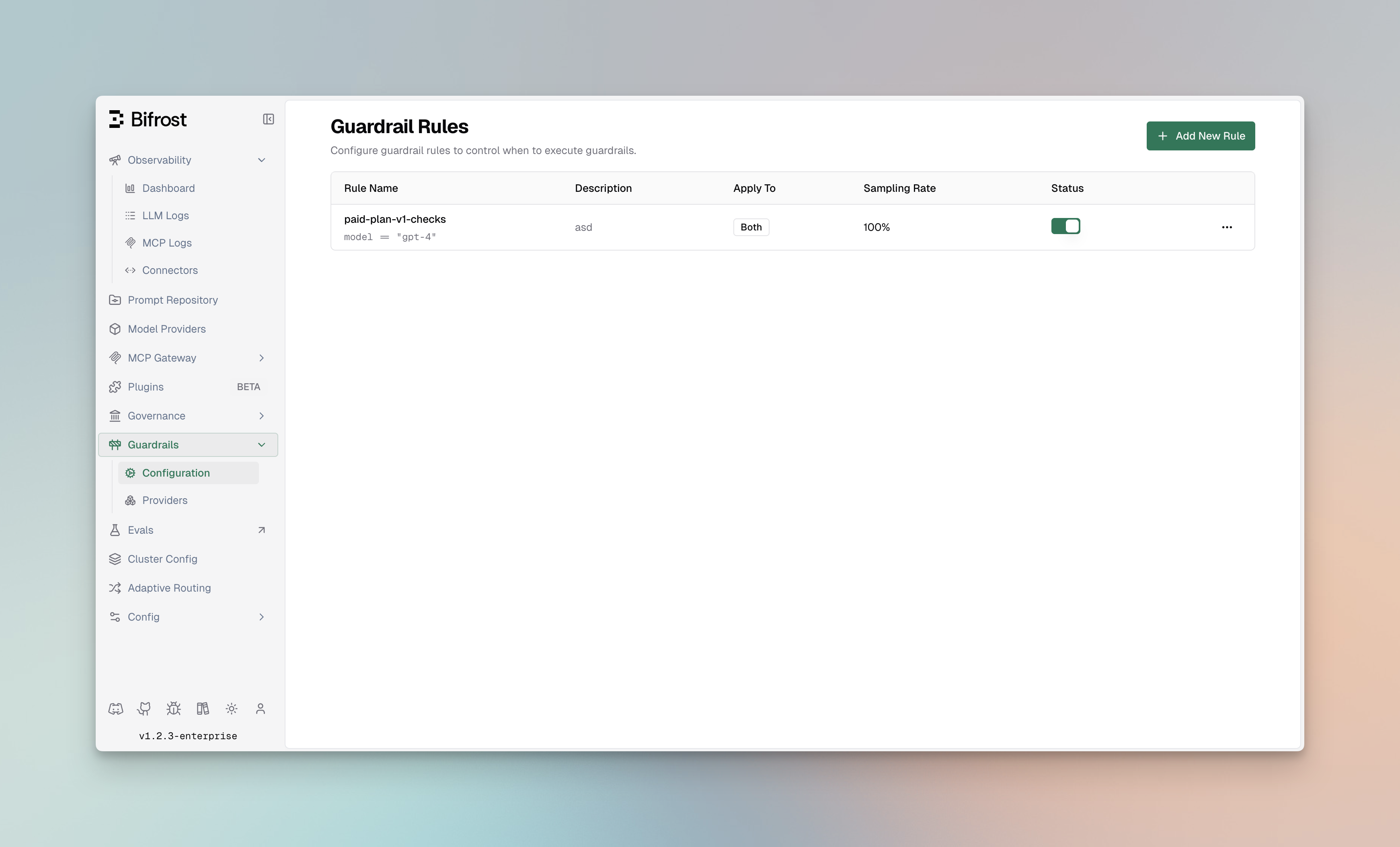
What you configure
Section titled “What you configure”You set up guardrails with two building blocks. You create Profiles first, then write Rules that point at them:
| Building block | What you do with it |
|---|---|
| Profiles | Connect an external guardrail provider (AWS Bedrock, Azure Content Safety, GraySwan, or Patronus AI) once with its credentials and detection settings. A profile is reusable - link it from as many rules as you like. |
| Rules | Decide when and what to check, using a CEL (Common Expression Language) condition. A rule applies to inputs, outputs, or both, and links to one or more profiles. Link several profiles to one rule for layered (defense-in-depth) protection. |
Key Features
Section titled “Key Features”| Feature | Description |
|---|---|
| Multi-Provider Support | AWS Bedrock, Azure Content Safety, GraySwan, and Patronus AI integration |
| Dual-Stage Validation | Guard both inputs (prompts) and outputs (responses) |
| Real-Time Processing | Synchronous and asynchronous validation modes |
| CEL-Based Rules | Define custom policies using Common Expression Language |
| Reusable Profiles | Configure providers once, use across multiple rules |
| Sampling Control | Apply rules to a percentage of requests for performance tuning |
| Automatic Remediation | Block, redact, or modify content based on policy |
| Comprehensive Logging | Detailed audit trails for compliance |
Navigating Guardrails in the UI
Section titled “Navigating Guardrails in the UI”Access Guardrails from the DeepIntShield dashboard:
| Page | Path | Description |
|---|---|---|
| Configuration | Guardrails > Configuration | Manage guardrail rules and their settings |
| Providers | Guardrails > Providers | Configure and manage guardrail profiles |
When a request comes in, your input rules check the prompt before it reaches the provider, and your output rules check the response before it returns. A check that fails can block, redact, or modify the content based on the matching profile and policy.
Supported Guardrail Providers
Section titled “Supported Guardrail Providers”DeepIntShield integrates with leading guardrail providers to offer comprehensive protection:
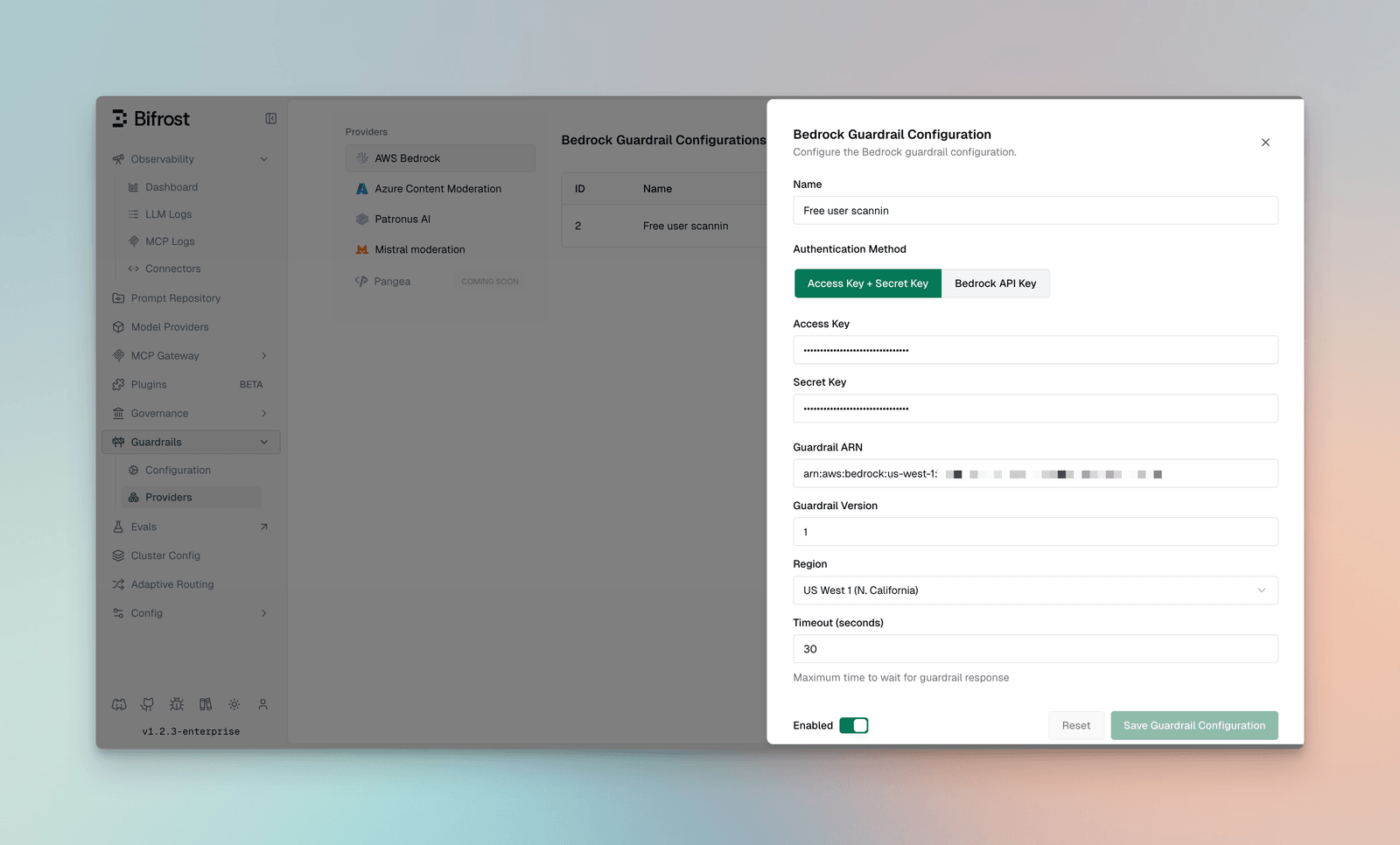
AWS Bedrock Guardrails
Section titled “AWS Bedrock Guardrails”Amazon Bedrock Guardrails provides enterprise-grade content filtering and safety features with deep AWS integration.
Capabilities:
- Content Filters: Hate speech, insults, sexual content, violence, misconduct
- Denied Topics: Block specific topics or categories
- Word Filters: Custom profanity and sensitive word blocking
- PII Protection: Detect and redact 50+ PII entity types
- Contextual Grounding: Verify responses against source documents
- Prompt Attack Detection: Identify injection and jailbreak attempts
- Image Content Support: Analyze images in addition to text (PNG, JPEG)
Configuration Fields:
| Field | Type | Required | Default | Description |
|---|---|---|---|---|
access_key | string | No* | - | AWS Access Key ID |
secret_key | string | No* | - | AWS Secret Access Key |
bedrock_api_key | string | No* | - | Alternative Bedrock API key (Bearer token) |
guardrail_arn | string | Yes | - | ARN of the Bedrock guardrail |
guardrail_version | string | Yes | - | Version of the guardrail (e.g., “1”, “DRAFT”) |
region | string | Yes | - | AWS region |
Authentication Methods:
Uses AWS SDK with static credentials:
{ "access_key": "AKIAXXXXXXXXXXXXXXXXXX", "secret_key": "your-secret-access-key", "guardrail_arn": "arn:aws:bedrock:us-east-1:123456789:guardrail/abc123", "guardrail_version": "1", "region": "us-east-1"}Uses HTTP REST API with Bearer token:
{ "bedrock_api_key": "your-bedrock-api-key", "guardrail_arn": "arn:aws:bedrock:us-east-1:123456789:guardrail/abc123", "guardrail_version": "1", "region": "us-east-1"}Supported AWS Regions:
| Region Code | Region Name |
|---|---|
us-east-1 | US East (N. Virginia) |
us-east-2 | US East (Ohio) |
us-west-1 | US West (N. California) |
us-west-2 | US West (Oregon) |
ap-south-1 | Asia Pacific (Mumbai) |
ap-northeast-1 | Asia Pacific (Tokyo) |
ap-northeast-2 | Asia Pacific (Seoul) |
ap-southeast-1 | Asia Pacific (Singapore) |
ap-southeast-2 | Asia Pacific (Sydney) |
eu-central-1 | Europe (Frankfurt) |
eu-west-1 | Europe (Ireland) |
eu-west-2 | Europe (London) |
eu-west-3 | Europe (Paris) |
Supported Content Types:
- Text content
- Images (PNG, JPEG formats)
Usage Metrics Returned:
Bedrock guardrails return detailed usage metrics for cost tracking and monitoring:
| Metric | Description |
|---|---|
content_policy_units | Units consumed by content policy evaluation |
contextual_grounding_policy_units | Units for grounding checks |
sensitive_information_policy_units | Units for PII detection |
topic_policy_units | Units for topic filtering |
word_policy_units | Units for word filtering |
automated_reasoning_policy_units | Units for reasoning checks |
content_policy_image_units | Units for image content analysis |
Supported PII Types:
- Personal identifiers (SSN, passport, driver’s license)
- Financial information (credit cards, bank accounts)
- Contact information (email, phone, address)
- Medical information (health records, insurance)
- Device identifiers (IP addresses, MAC addresses)
Azure Content Safety
Section titled “Azure Content Safety”Azure AI Content Safety provides multi-modal content moderation powered by Microsoft’s advanced AI models.
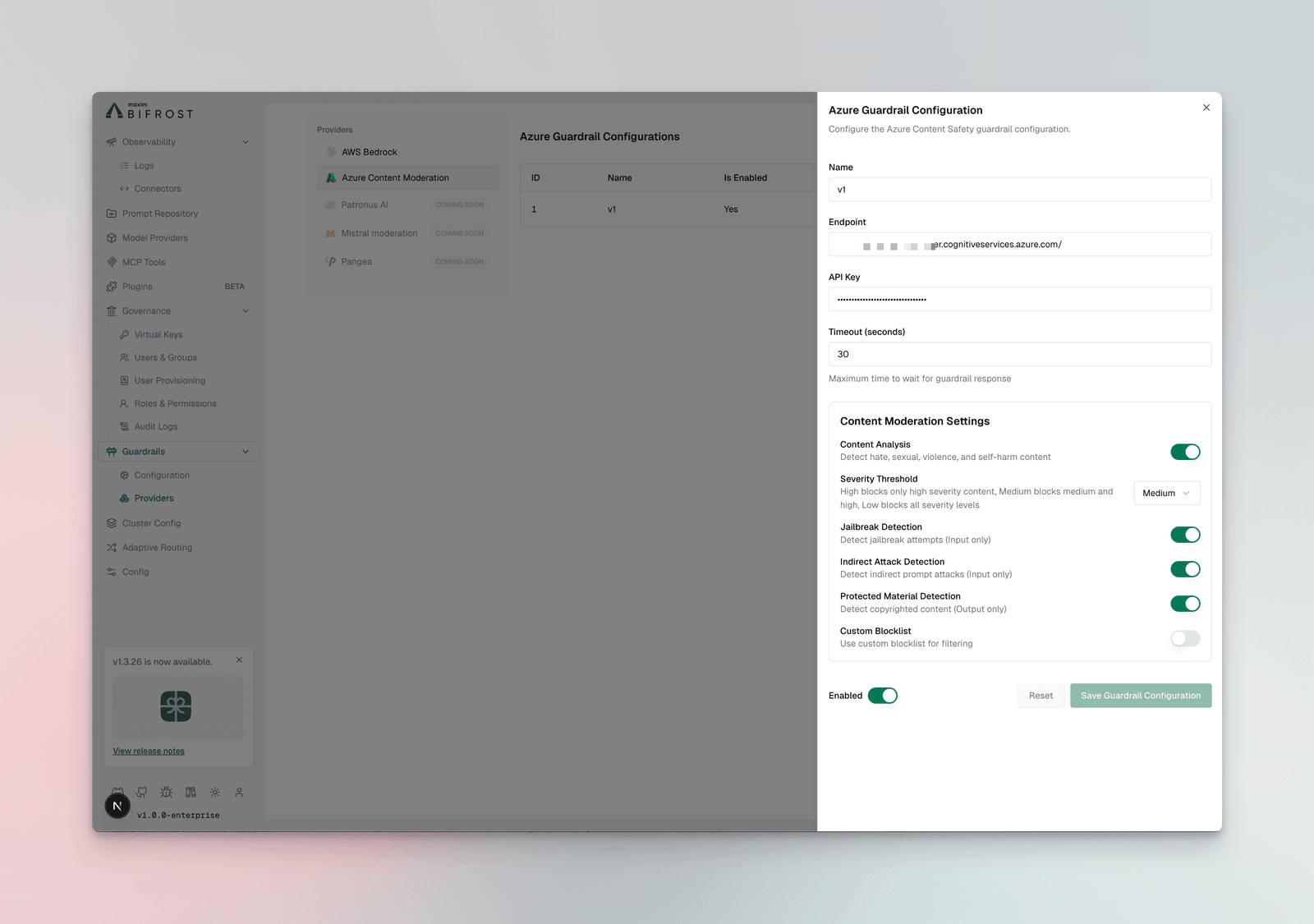
Capabilities:
- Severity-Based Filtering: 4-level severity classification (Safe, Low, Medium, High)
- Multi-Category Detection: Hate, sexual, violence, self-harm content
- Prompt Shield: Advanced jailbreak and injection detection
- Indirect Attack Detection: Identify hidden malicious instructions
- Protected Material: Detect copyrighted content (output only)
- Custom Blocklists: Define organization-specific blocked terms
Configuration Fields:
| Field | Type | Required | Default | Description |
|---|---|---|---|---|
endpoint | string | Yes | - | Azure Content Safety endpoint URL |
api_key | string | Yes | - | Azure subscription key |
analyze_enabled | boolean | No | true | Enable content analysis for Hate, Sexual, Violence, SelfHarm |
analyze_severity_threshold | enum | No | ”medium” | Severity level to trigger: low, medium, or high |
jailbreak_shield_enabled | boolean | No | false | Enable jailbreak detection (input only) |
indirect_attack_shield_enabled | boolean | No | false | Enable indirect prompt attack detection (input only) |
copyright_enabled | boolean | No | false | Enable copyrighted content detection (output only) |
text_blocklist_enabled | boolean | No | false | Enable custom blocklist filtering |
blocklist_names | array | No | - | List of Azure blocklist names to apply |
Severity Threshold Levels:
| Threshold | Numeric Value | Behavior |
|---|---|---|
low | 2 | Most strict - blocks severity 2 and above |
medium | 4 | Balanced - blocks severity 4 and above |
high | 6 | Least strict - blocks only severity 6 |
Detection Categories:
- Hate and fairness
- Sexual content
- Violence
- Self-harm
Patronus AI
Section titled “Patronus AI”Patronus AI specializes in LLM security and safety with advanced evaluation capabilities.
Capabilities:
- Hallucination Detection: Identify factually incorrect responses
- PII Detection: Comprehensive personal data identification
- Toxicity Screening: Multi-language toxic content detection
- Prompt Injection Defense: Advanced attack pattern recognition
- Custom Evaluators: Build organization-specific safety checks
- Real-Time Monitoring: Continuous safety validation
Advanced Features:
- Context-aware evaluation
- Multi-turn conversation analysis
- Custom policy templates
- Integration with existing safety workflows
GraySwan Cygnal
Section titled “GraySwan Cygnal”GraySwan Cygnal Monitor provides AI safety monitoring with natural language rule definitions and advanced threat detection capabilities.
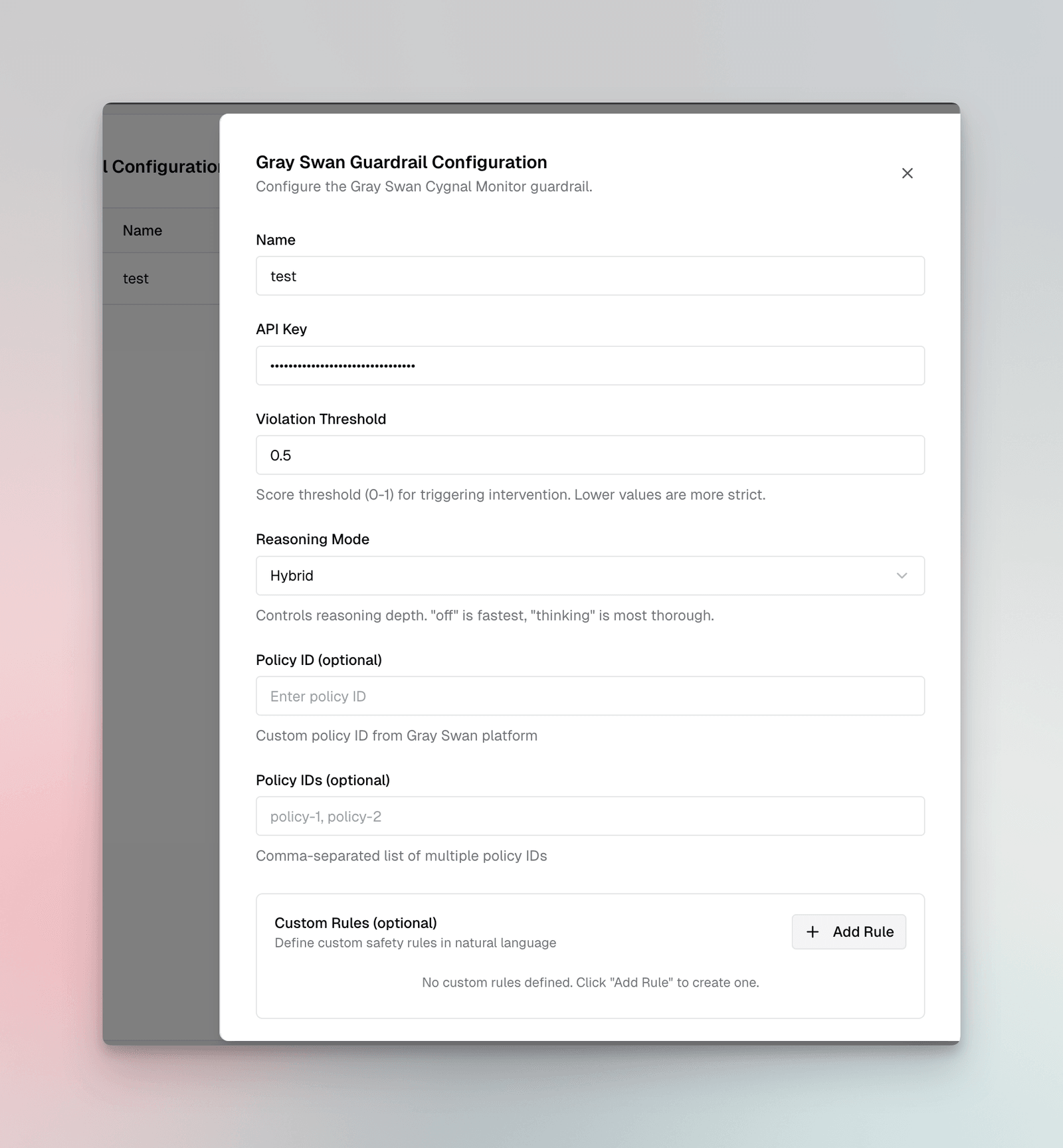
Capabilities:
- Violation Scoring: Continuous 0-1 scale violation detection with configurable thresholds
- Custom Natural Language Rules: Define safety rules in plain English without code
- Policy Management: Use pre-built policies from GraySwan platform or create custom ones
- Indirect Prompt Injection (IPI) Detection: Identify hidden instructions in user inputs
- Mutation Detection: Detect attempts to manipulate or alter content
- Reasoning Modes: Choose from fast (“off”), balanced (“hybrid”), or thorough (“thinking”) analysis
Configuration Fields:
| Field | Type | Required | Default | Description |
|---|---|---|---|---|
api_key | string | Yes | - | GraySwan API key |
violation_threshold | number | No | 0.5 | Score threshold (0-1) for triggering intervention. Lower values are more strict. |
reasoning_mode | enum | No | ”off” | Analysis depth: off (fastest), hybrid (balanced), or thinking (most thorough) |
policy_id | string | No | - | Single custom policy ID from GraySwan platform |
policy_ids | array | No | - | Multiple policy IDs for aggregated rule evaluation |
rules | object | No | - | Custom natural language rules as key-value pairs |
Custom Rules Example:
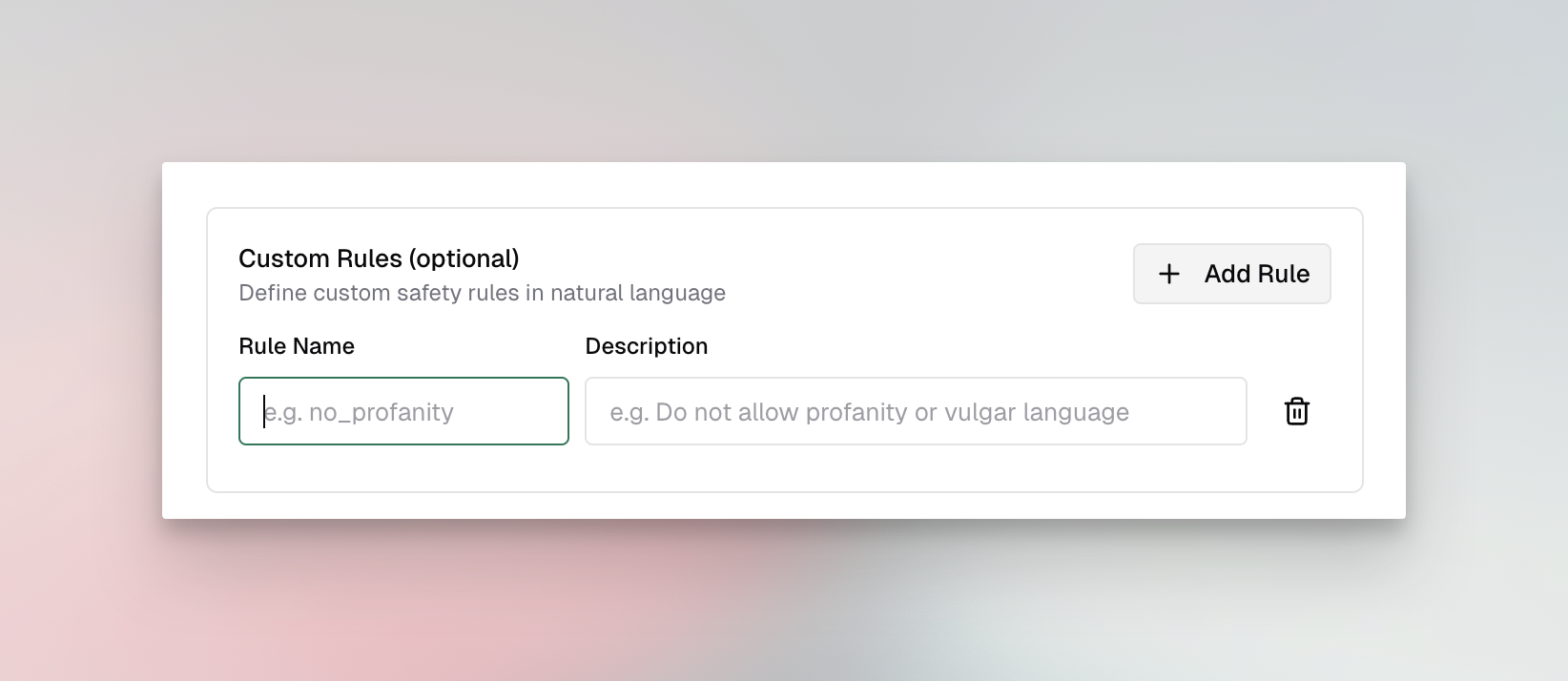
Rules are defined as key-value pairs where the key is the rule name and the value is a natural language description:
{ "rules": { "no_profanity": "Do not allow profanity or vulgar language", "no_pii": "Do not allow personally identifiable information", "professional_tone": "Ensure all responses maintain a professional tone" }}Detection Features:
- Real-time violation scoring
- Multi-rule evaluation
- IPI attack detection
- Content mutation monitoring
- Detailed violation descriptions with rule attribution
Guardrail Rules
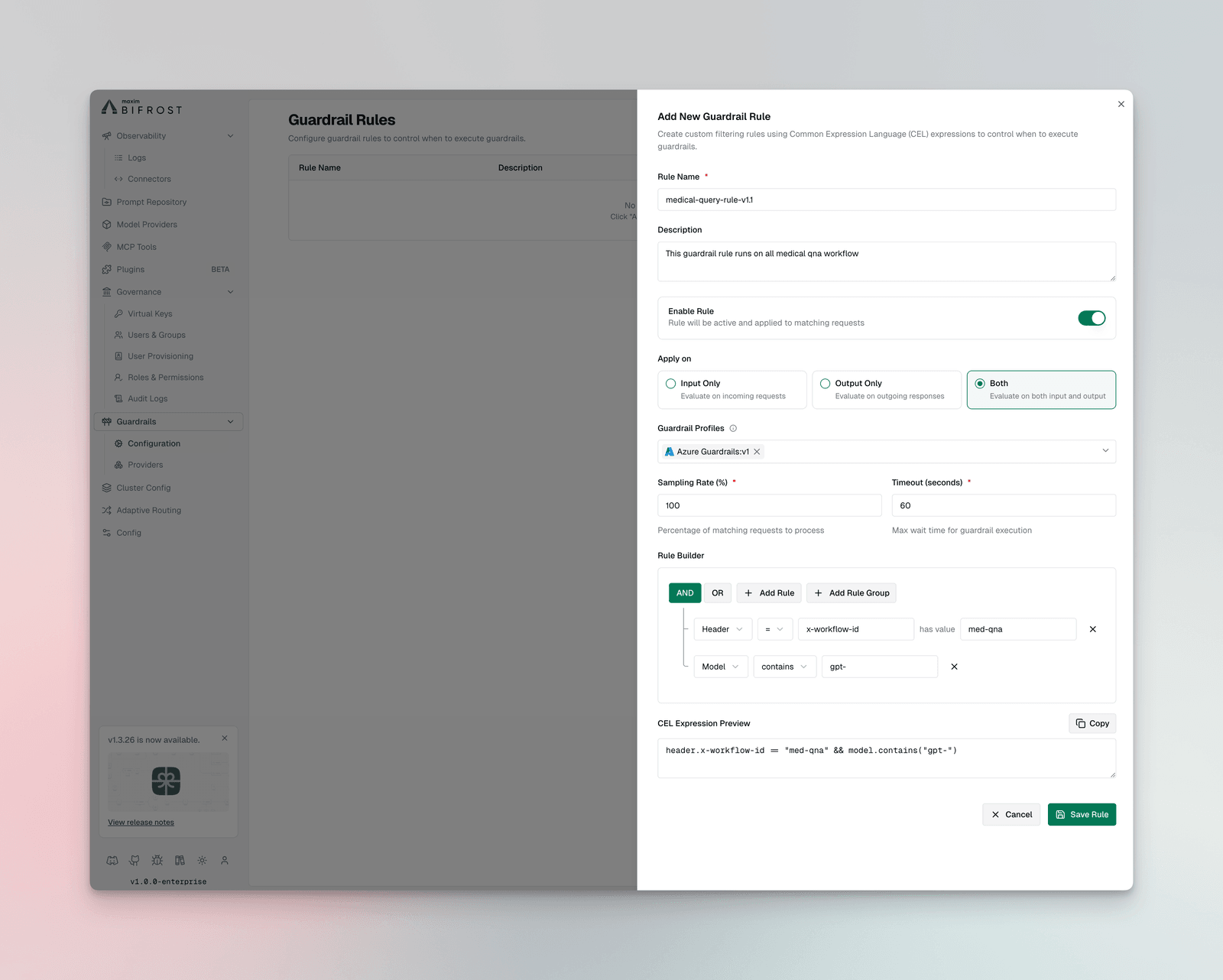
Section titled “Guardrail Rules”Guardrail Rules are custom policies that define when and how content validation occurs. Rules use CEL (Common Expression Language) expressions to evaluate requests and can be linked to one or more profiles for execution.
Rule Properties
Section titled “Rule Properties”| Property | Type | Required | Description |
|---|---|---|---|
id | integer | Yes | Unique identifier for the rule |
name | string | Yes | Descriptive name for the rule |
description | string | No | Explanation of what the rule does |
enabled | boolean | Yes | Whether the rule is active |
cel_expression | string | Yes | CEL expression for rule evaluation |
apply_to | enum | Yes | When to apply: input, output, or both |
sampling_rate | integer | No | Percentage of requests to evaluate (0-100) |
timeout | integer | No | Execution timeout in milliseconds |
provider_config_ids | array | No | IDs of profiles to use for evaluation |
Creating Rules
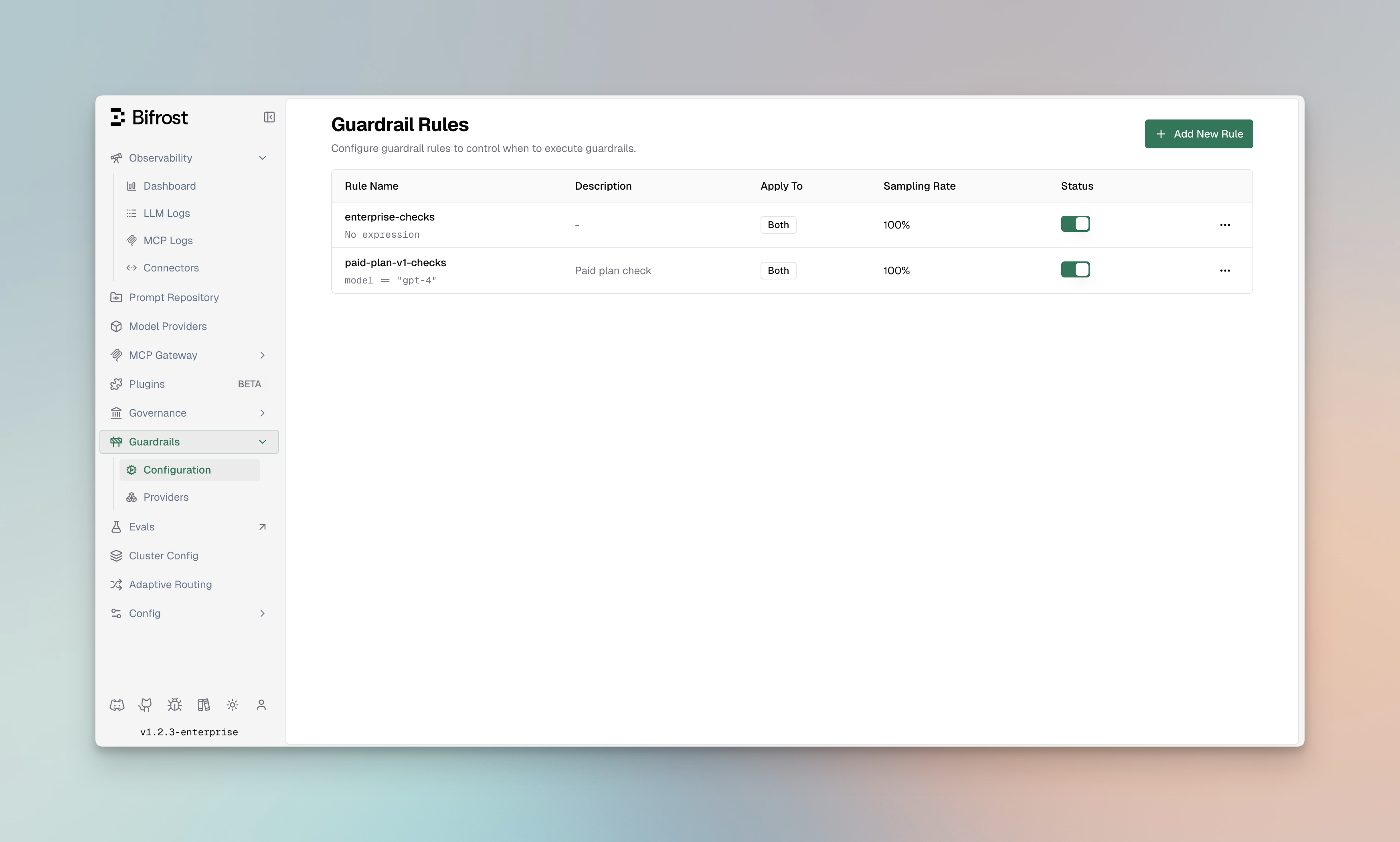
Section titled “Creating Rules”- Navigate to Rules
- Go to Guardrails > Configuration
- Click Add Rule
- Configure Rule Settings
Basic Information:
- Name: Enter a descriptive name (e.g., “Block PII in Prompts”)
- Description: Explain the rule’s purpose
- Enabled: Toggle to activate the rule
Evaluation Settings:
- Apply To: Select when to apply the rule
input- Validate incoming prompts onlyoutput- Validate LLM responses onlyboth- Validate both inputs and outputs
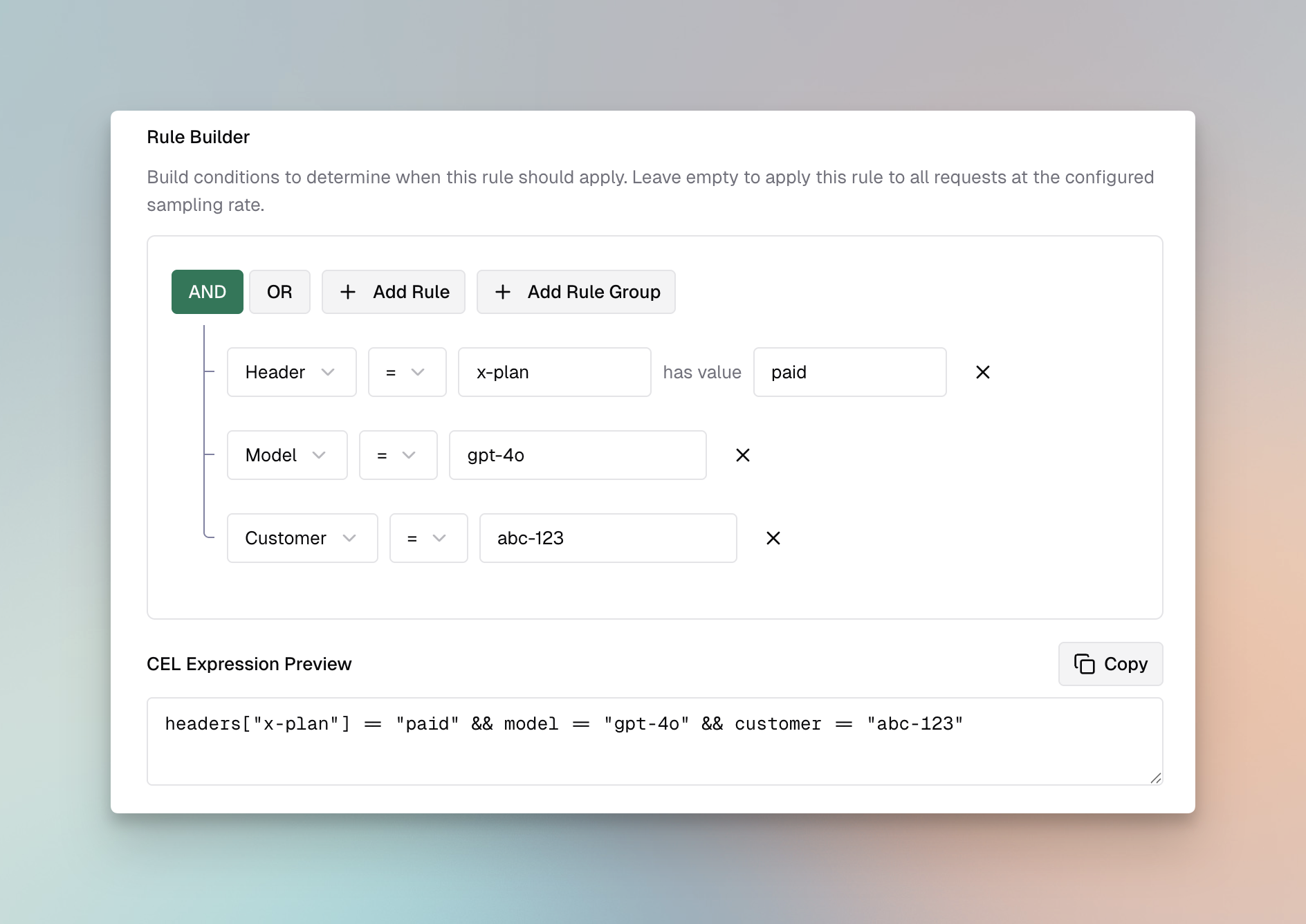
- CEL Expression: Define the validation logic
- Sampling Rate: Set percentage of requests to evaluate (default: 100%)
- Timeout: Set maximum execution time in milliseconds
-
Link Profiles
- Select one or more profiles to use for evaluation
- Rules will execute all linked profiles in sequence
-
Save and Test
- Click Save Rule
- Use the Test button to validate with sample content
guardrails_config: guardrail_rules: - id: 1 name: "Block PII in Prompts" description: "Prevent PII from being sent to LLM providers" enabled: true cel_expression: "request.messages.exists(m, m.role == 'user')" apply_to: "input" sampling_rate: 100 timeout: 5000 provider_config_ids: [1, 2] - id: 2 name: "Content Filter for Responses" description: "Filter harmful content from LLM responses" enabled: true cel_expression: "true" apply_to: "output" sampling_rate: 100 timeout: 3000 provider_config_ids: [2]CEL Expression Examples
Section titled “CEL Expression Examples”CEL (Common Expression Language) provides a powerful way to define rule conditions. Here are common patterns:
Always Apply Rule:
trueApply to User Messages Only:
request.messages.exists(m, m.role == "user")Apply to Messages Containing Keywords:
request.messages.exists(m, m.content.contains("confidential"))Apply Based on Model:
request.model.startsWith("gpt-4")Apply to Long Prompts:
request.messages.filter(m, m.role == "user").map(m, m.content.size()).sum() > 1000Combine Multiple Conditions:
request.model.startsWith("gpt-4") && request.messages.exists(m, m.role == "user" && m.content.size() > 500)Linking Rules to Profiles
Section titled “Linking Rules to Profiles”Rules can be linked to multiple profiles for comprehensive validation:
Best Practices:
- Link PII detection rules to profiles with PII capabilities (Bedrock, Patronus)
- Link content filtering rules to profiles with content safety features (Azure, Bedrock, GraySwan)
- Use GraySwan for custom natural language rules when you need flexible, readable policies
- Use multiple profiles for defense-in-depth (e.g., Bedrock + Patronus for PII, Azure + GraySwan for content)
- Set appropriate timeouts when using multiple profiles
Managing Profiles
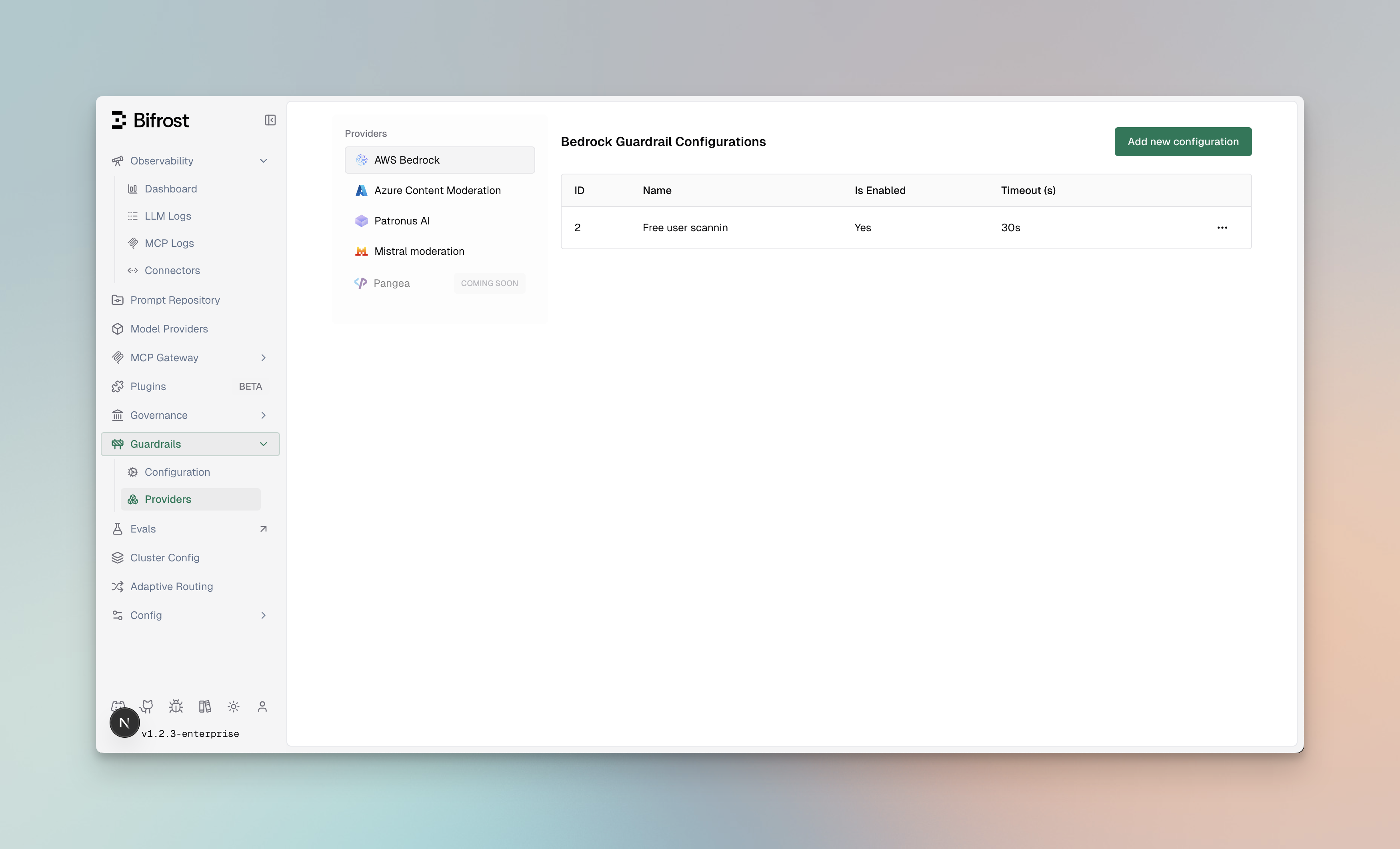
Section titled “Managing Profiles”Profiles are reusable configurations for external guardrail providers. Each profile contains provider-specific settings including credentials, endpoints, and detection thresholds.
Profile Properties
Section titled “Profile Properties”| Property | Type | Required | Description |
|---|---|---|---|
id | integer | Yes | Unique identifier for the profile |
provider_name | string | Yes | Provider type: bedrock, azure, grayswan, patronus_ai |
policy_name | string | Yes | Descriptive name for the policy |
enabled | boolean | Yes | Whether the profile is active |
config | object | No | Provider-specific configuration |
Creating Profiles
Section titled “Creating Profiles”- Navigate to Providers
- Go to Guardrails > Providers
- Click Add Profile
-
Select Provider Type
- Choose from: AWS Bedrock, Azure Content Safety, GraySwan, or Patronus AI
-
Configure Provider Settings
- Enter credentials and endpoint information
- Configure detection thresholds and actions
- See provider-specific setup sections above for detailed configuration
-
Save Profile
- Click Save Profile
- The profile is now available for linking to rules
guardrails_config: guardrail_providers: - id: 1 provider_name: "bedrock" policy_name: "PII Detection Profile" enabled: true config: guardrail_arn: "arn:aws:bedrock:us-east-1:123456789:guardrail/abc123" guardrail_version: "1" region: "us-east-1" # AWS Authentication (choose one method): # Option 1: Explicit credentials access_key: "${AWS_ACCESS_KEY_ID}" secret_key: "${AWS_SECRET_ACCESS_KEY}" # Option 2: IAM Role - omit access_key and secret_key # (DeepIntShield will use IAM credentials from the environment) - id: 2 provider_name: "azure" policy_name: "Content Safety Profile" enabled: true config: endpoint: "https://your-resource.cognitiveservices.azure.com/" api_key: "${AZURE_CONTENT_SAFETY_API_KEY}" analyze_enabled: true analyze_severity_threshold: "medium" jailbreak_shield_enabled: true - id: 3 provider_name: "grayswan" policy_name: "Custom Safety Rules" enabled: true config: api_key: "${GRAYSWAN_API_KEY}" violation_threshold: 0.5 reasoning_mode: "hybrid" rules: no_pii: "Do not allow personally identifiable information" professional_tone: "Ensure responses maintain a professional tone" - id: 4 provider_name: "patronus_ai" policy_name: "Hallucination Detection" enabled: true config: api_endpoint: "https://api.patronus.ai/v1"Provider Capabilities
Section titled “Provider Capabilities”Each provider offers different capabilities. Choose profiles based on your validation needs:
| Capability | AWS Bedrock | Azure Content Safety | GraySwan | Patronus AI |
|---|---|---|---|---|
| PII Detection | Yes | No | No | Yes |
| Content Filtering | Yes | Yes | Yes | Yes |
| Prompt Injection | Yes | Yes | Yes | Yes |
| Hallucination Detection | No | No | No | Yes |
| Toxicity Screening | Yes | Yes | Yes | Yes |
| Custom Policies | Yes | Yes | Yes | Yes |
| Custom Natural Language Rules | No | No | Yes | No |
| Image Support | Yes | No | No | No |
| IPI Detection | No | Yes | Yes | No |
| Mutation Detection | No | No | Yes | No |
Best Practices
Section titled “Best Practices”Profile Organization:
- Create separate profiles for different use cases (PII, content filtering, etc.)
- Use descriptive policy names that indicate the profile’s purpose
- Keep credentials secure using environment variables
Performance Considerations:
- Enable only the profiles you need to minimize latency
- Use sampling rates on rules for high-traffic endpoints
- Set appropriate timeouts to prevent slow requests
Security:
- Store API keys and credentials in environment variables or secrets managers
- Regularly rotate credentials
- Use least-privilege IAM roles for AWS Bedrock
Using Guardrails in Requests
Section titled “Using Guardrails in Requests”Attaching guardrails to a virtual key
Section titled “Attaching guardrails to a virtual key”In production, guardrails are attached to a virtual key in the dashboard (Config → Guardrails) and run automatically on every request made with that key - there is no per-request header to set. Just call the gateway as usual:
curl -X POST https://app.deepintshield.com/v1/chat/completions \ -H "Authorization: Bearer sk-bf-your-virtual-key" \ -H "Content-Type: application/json" \ -d '{ "model": "gpt-4o-mini", "messages": [ { "role": "user", "content": "Help me with this task" } ] }'The input guardrails bound to that key run before the prompt reaches the provider, and any output guardrails run on the response before it is returned.
Note: Passing raw guardrail definitions inline on a request (
x-bf-input-guardrails/x-bf-output-guardrails) is restricted to the dashboard test-lab simulation flow. For live traffic, bind guardrails to the virtual key as shown above.
Reading the guardrail outcome
Section titled “Reading the guardrail outcome”DeepintShield reports the guardrail result on response headers, not in the response body:
| Header | Values | Meaning |
|---|---|---|
x-deepintshield-guardrail-status | pass, blocked, redacted, flagged | Outcome of the guardrail evaluation |
x-deepintshield-guardrail-mode | sync, async, shadow | Execution mode the guardrail ran in |
Passed (HTTP 200) - the normal completion is returned, with
x-deepintshield-guardrail-status: pass:
{ "id": "chatcmpl-abc123", "object": "chat.completion", "model": "gpt-4o-mini", "choices": [ { "index": 0, "message": { "role": "assistant", "content": "I'd be happy to help..." }, "finish_reason": "stop" } ]}Blocked (HTTP 403) - the request is rejected with a guardrail_blocked
error and x-deepintshield-guardrail-status: blocked:
{ "error": { "type": "guardrail_blocked", "code": "guardrail_blocked", "message": "Request blocked by guardrail policy" }}When a guardrail is configured to redact rather than block, the completion is
returned (HTTP 200) with the offending content removed and
x-deepintshield-guardrail-status: redacted. In monitor / shadow mode the
request is never blocked - the violation is only recorded - and the status
header reflects flagged.
Multimodal guardrails
Section titled “Multimodal guardrails”By default the guardrail engine evaluates text, chat, responses and passthrough
requests. Multimodal guardrails extend the same policy engine, decision path
and x-deepintshield-guardrail-* headers to non-text endpoints - so image,
audio and video traffic is governed exactly like text, with one consistent
verdict model.
What gets guarded
Section titled “What gets guarded”| Endpoint | Request type | What is evaluated |
|---|---|---|
| Image generation | image_generation | The prompt (and negative prompt) |
| Image edit | image_edit | The prompt + text embedded in the source images (PNG/JPEG metadata, OCR-style strings) |
| Speech / TTS | speech | The text to synthesize + voice instructions |
| Transcription | transcription | The produced transcript (output side) |
| Video generation | video_generation | The prompt (and negative prompt) |
| Embeddings | embedding | The input text(s) |
| Rerank | rerank | The query + candidate documents |
The text these requests already carry is guarded by the existing text detectors. Binary artifacts (source images, generated images, audio, video) are forwarded to the guard runtime as attachments - fingerprinted with a content hash for deduplication - where a modality-extraction stage resolves them to text (document/OCR text today; OCR/STT/keyframe extractors are pluggable) and optional modality detectors (vision/audio safety models) score them natively.
Enabling it
Section titled “Enabling it”Multimodal guarding is off by default - when disabled, behavior is identical
to text-only guarding and there is no added latency on any request. Enable it
with environment variables (Helm: deepintshield.guardrails.*):
| Variable | Component | Effect |
|---|---|---|
GUARDRAILS_MULTIMODAL | gateway | Gate image/audio/video/embedding/rerank requests into the engine and guard the text they carry; forward artifacts as attachments |
GUARDRAILS_MODALITY_INLINE_BYTES | gateway | Inline raw artifact bytes into the guard request so the extraction stage can process them (otherwise only metadata + content hash are sent) |
GUARDRAILS_STREAM_ACCUMULATE | gateway | Guard streamed output on a growing window so a violation split across chunks is caught |
DEEPINTSHIELD_GUARD_MODALITY_EXTRACT | guard runtime | Run the modality-extraction / detector stage over forwarded attachments |
Performance & scale
Section titled “Performance & scale”- Zero added latency when off, and near-zero when on for the common case: the text already present (prompts, transcripts) reuses the existing text path.
- Bounded work - per-request attachment count, per-asset byte size and extracted-text length are all capped, and identical assets are deduplicated by content hash, so a large image or video can never tie up a worker.
- Scales horizontally - heavy extraction/detection runs in the separately deployable guard runtime, off the gateway hot path.
Analytics
Section titled “Analytics”Multimodal activity appears on the Guardrail Metrics → Multimodal tab (workspace analytics): a decision timeline by modality, request distribution, decision breakdown, and attachment-level findings - using the same filters and date range as the other guardrail dashboards.